
What are trial reels?
A trial reel is a reel that Instagram shows to people who don’t follow you first. It stays out of your followers’ feed and Reels tab, and off your profile, until you share it to everyone. Its numbers come in within a day, sometimes within the hour, so you soon know whether to share it or try again.
- Who sees it
- People who don’t follow youKept out of your followers’ feed and off your profile grid
- Who can post one
- A public account200 followers on a professional account, 1,000 on a personal one
- First numbers
- Within 24 hoursInstagram’s limit. On our test account, views showed within the hour
- Reaching your followers
- Share to everyoneBy hand at any time, or automatically if it does well early on
Already have a trial’s numbers? Skip to the results reader.
How to post a trial reel on Instagram
Trial is a switch in the normal posting flow, so there’s nothing to sign up for. In the Instagram app:
- Make a new reel as usual, caption and all.
- Before you share, tap Trial.
- Tap Next, then Share.
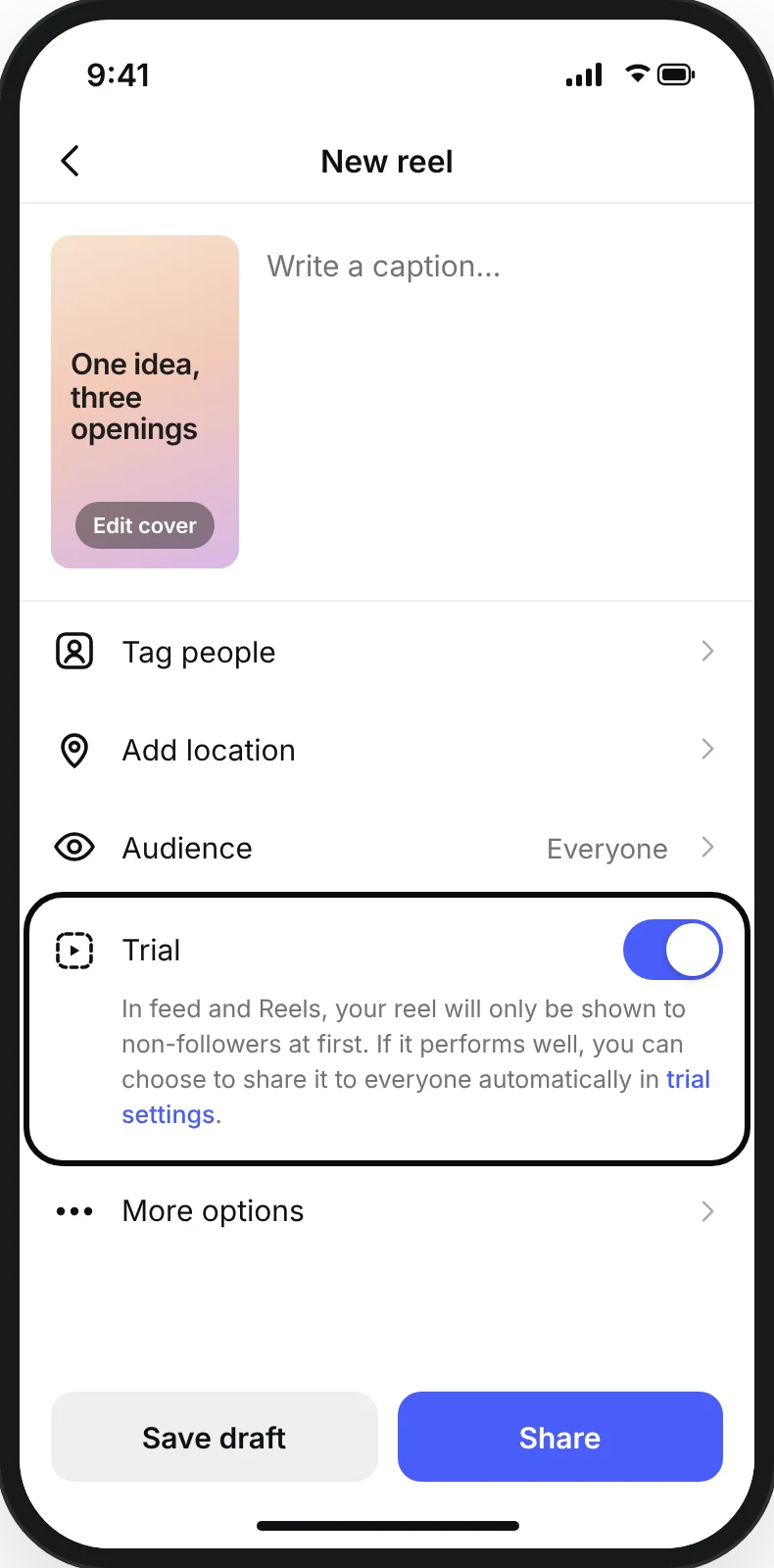
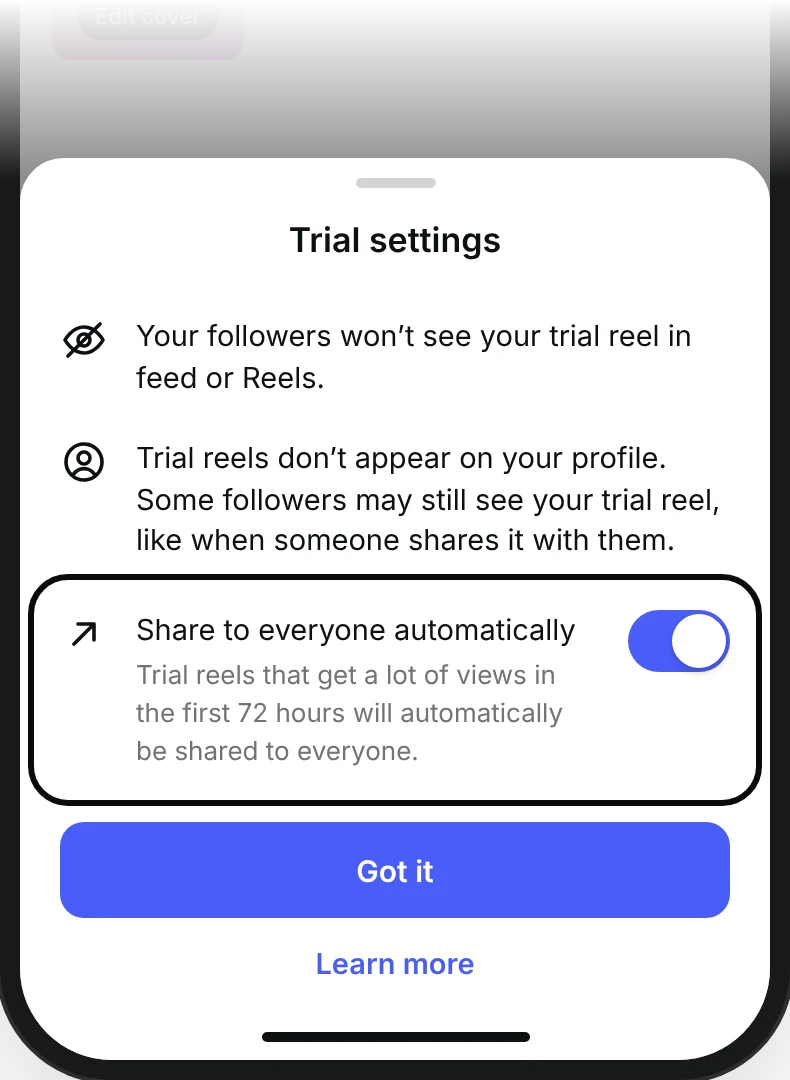
Before you tap Share, you can also let Instagram do the sharing for you: tap Trial settings below Trial, turn on Share to everyone automatically and tap Got it. Instagram then shares the reel with your followers if it does well soon after posting. That setting stays on for every trial you post after it, until you turn it off.
Make each trial a new video. Instagram says a trial “may get limited reach if Instagram detects that you’ve previously shared the same content”, so posting an old reel again as a trial works against you.
Who can use trial reels
Any public account with enough followers. Instagram’s help page sets the number by account type:
| Account type | Followers you need |
|---|---|
| Professional (creator or business) | 200 |
| Personal | 1,000 |
If you’ve read that you need 1,000, that’s the number for personal accounts. If the Trial switch isn’t there for you, check that:
- the account is public;
- it has enough followers for its type;
- it can appear in recommendations. Instagram takes trials away from an account that can’t, until it can again. You’ll find this under Account Status in your settings.
What happens after you post a trial reel
- Right away
Instagram starts showing it to people who don’t follow you. Your followers won’t get it in their feed or Reels tab, and it’s hidden from your profile. Only you can tell it’s a trial. A follower can still come across it, for example when someone sends it to them or on the page for its audio.
- First hour to a day
Views can start to show within the hour, as they did on our test account. Instagram says its insights arrive within 24 hours: views, likes, comments and shares, and how the trial is doing against your earlier ones. Trials can still take longer to get views, Instagram adds, because they’re shown to people who don’t follow you.
- First 72 hours
If Share to everyone automatically is on, Instagram decides in this window, from the views and engagement the trial gets.
- Any time
You can share it to everyone yourself: on your profile, open the Reels tab, tap the reel, tap View insights, then Share to everyone. It then shows on your grid and in your Reels tab, and your followers may see it in their feed.
A trial doesn’t drag down your other reels. Instagram says trials “are evaluated independently in Instagram’s ranking and don’t impact the performance or ranking of your standard reels content.”
How many trial reels can you post a day?
Instagram doesn’t set a number, on its help page or in its announcement. Since each trial should be a new video, the limit in practice is how many versions you can make.
Since April 2026 you can also schedule a trial in the Instagram app.
What to test with a trial reel
A trial tells you whether a reel works on people who don’t know you. To learn why, change one thing against your usual reel and keep the rest the same. Start with the hook, the first thing a stranger sees.
| Test | What to change | What tells you |
|---|---|---|
| Hook | The first line, or the first second on screen | Average watch time, then views |
| Length | The same script, cut shorter | Average watch time against the length |
| Format | The same script as a talking head, as text over b-roll (background footage), as a list or as a demo | Views and average watch time |
| Cover | The image grids show before the reel plays | Views |
| Topic | A subject outside your usual niche, in your usual format | Views and follows |
Instagram’s own announcement pitched trials for that last one: for when “you want to try out a new genre, storytelling format or topic.”
Keep every trial to 3 minutes or less. Instagram only recommends reels up to 3 minutes to people who don’t follow you, and those are the people a trial is for. The reel size and length guide has the rest of the numbers.
How to read trial reel results
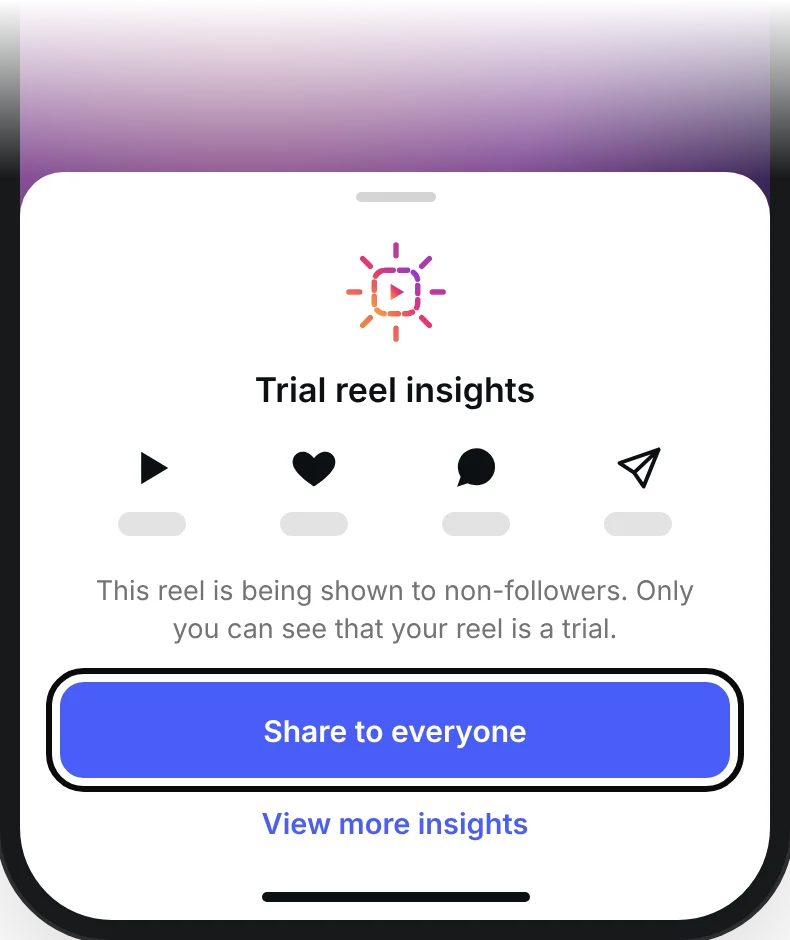
Open the trial from the Reels tab on your profile and tap View insights. A sheet shows its views, likes, comments and shares, with Share to everyone under them. View more insights opens the rest.
| In the insights | What it counts |
|---|---|
| Views | How many times it started to play, replays included |
| Viewers | How many different accounts saw it. On a trial, nearly all of them don’t follow you |
| Average watch time | How long a view lasted, on average |
| Shares | How many times people sent it to someone |
| Follows | How many people followed you after watching it |
Views are the quickest read, as long as you compare them with your usual. Look at the shares too. Adam Mosseri says the top ranking signals are “watch time, likes and sends”, and that “sends are slightly more important for unconnected content”, meaning people who don’t follow you yet.
Trial reel results reader
Type the numbers from the trial’s insights and your usual views. Nothing you type leaves this page.
| Trial views against your usual | What to do |
|---|---|
| 1.5× or more | Share it to everyone, and keep what you changed |
| 1× to 1.5× | Worth sharing. Keep the change and test the next thing |
| 0.6× to 1× | Your call. Leave it as a trial and try a stronger version of the change |
| Under 0.6× | Leave it as a trial. Change one thing and post a new one |
These bands are HandlePilot’s rule of thumb. Instagram doesn’t publish a line between a good trial and a bad one. In the first 24 hours, treat the answer as an early read.
Posting trial reels from HandlePilot
On a finished reel in HandlePilot’s Reel Maker, press Publish…, check the caption, then press Publish as trial reel. It goes out to your connected Instagram account right away, and you share it to everyone from the Instagram app once the numbers say so.
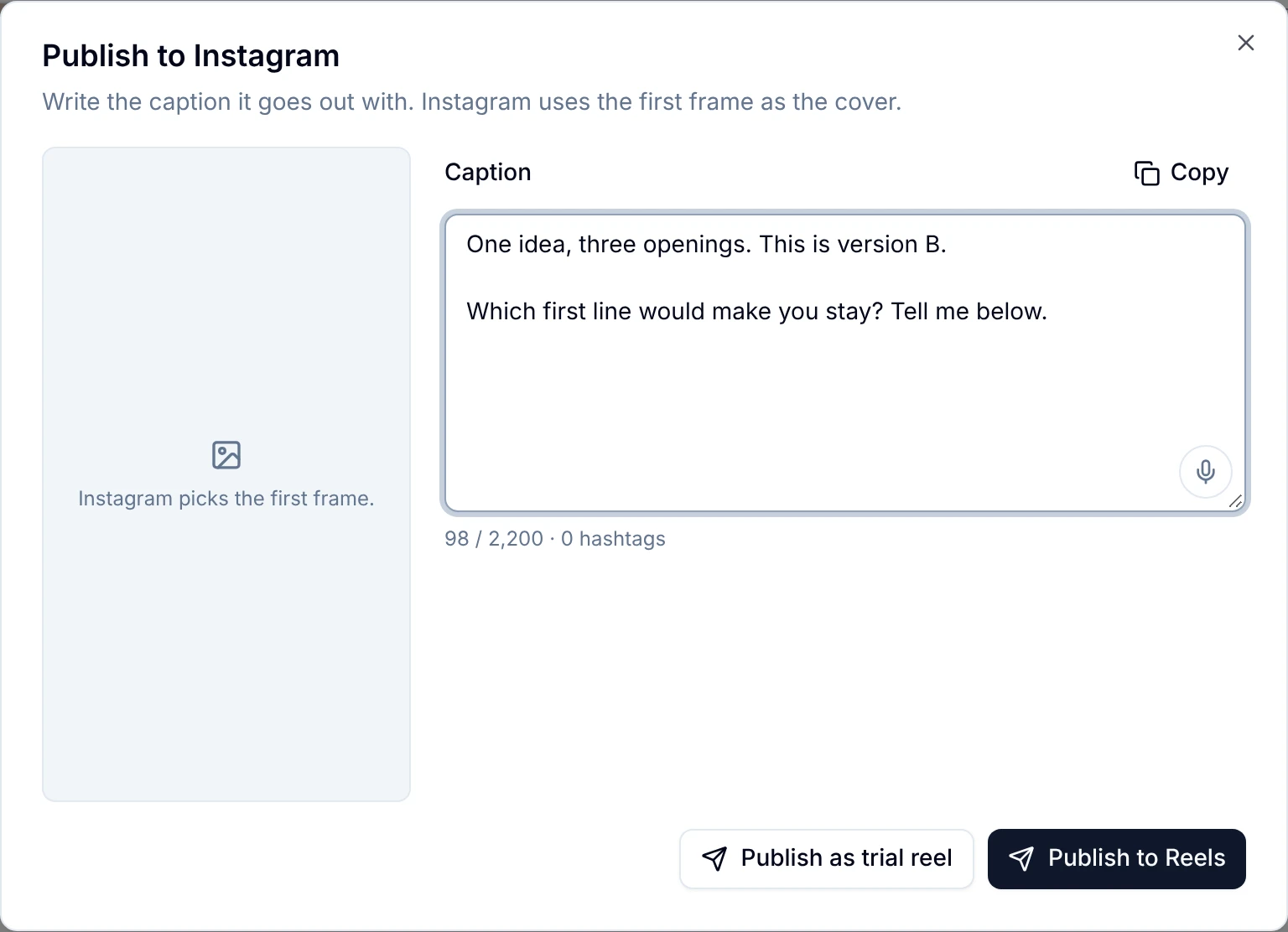
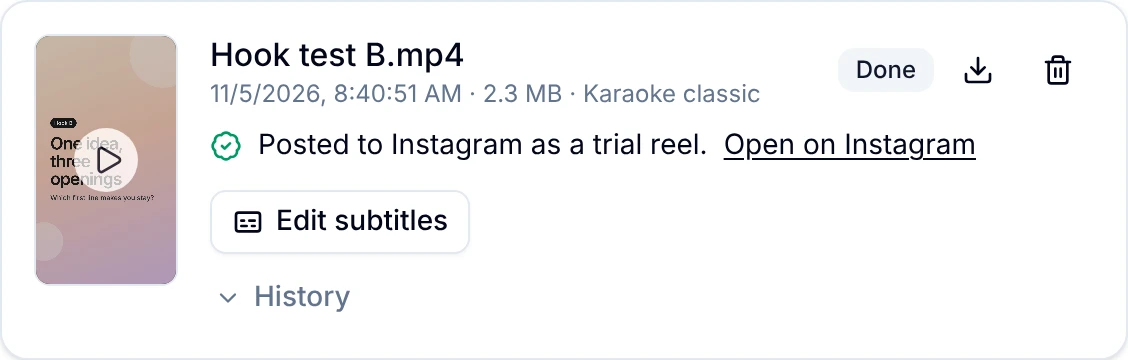
Posting needs your Instagram account connected on the HandlePilot Dashboard, and the trial button shows once the account has 1,000 followers. Under that, Publish to Reels posts it as a regular reel. HandlePilot doesn’t schedule trials.
Reel Maker is part of the Pro plan, at $50 a month. Signing up is free, and the free plan includes your Instagram dashboard and five carousels a month.
Test your next reel as a trial
Make the reel in Reel Maker from your own footage, then post it as a trial without leaving HandlePilot.